
Do you want the link to your event page to be different from the one automatically generated for events organized in Meeting Application? Just follow a few simple steps and you’re done 🙌🏽
To redirect your domain (e.g. moje-wydarzenie.pl) to the event website generated by the Meeting Application system (e.g. https://landing.meetingapplication.com/event/nazwa-twojego-eventu), you need to set up a so-called domain redirect.

301 redirect (permanent redirect)
This is the simplest and most commonly used method, which doesn’t require any actions from the Meeting Application team.
First, buy the domain you want to redirect from.
In the domain management panel, set a 301 (permanent redirect) to the event address in Meeting Application.
You’ll get the event address in Meeting Application by logging into the Admin Panel and clicking the LP link available in the Live Preview dropdown on the right.
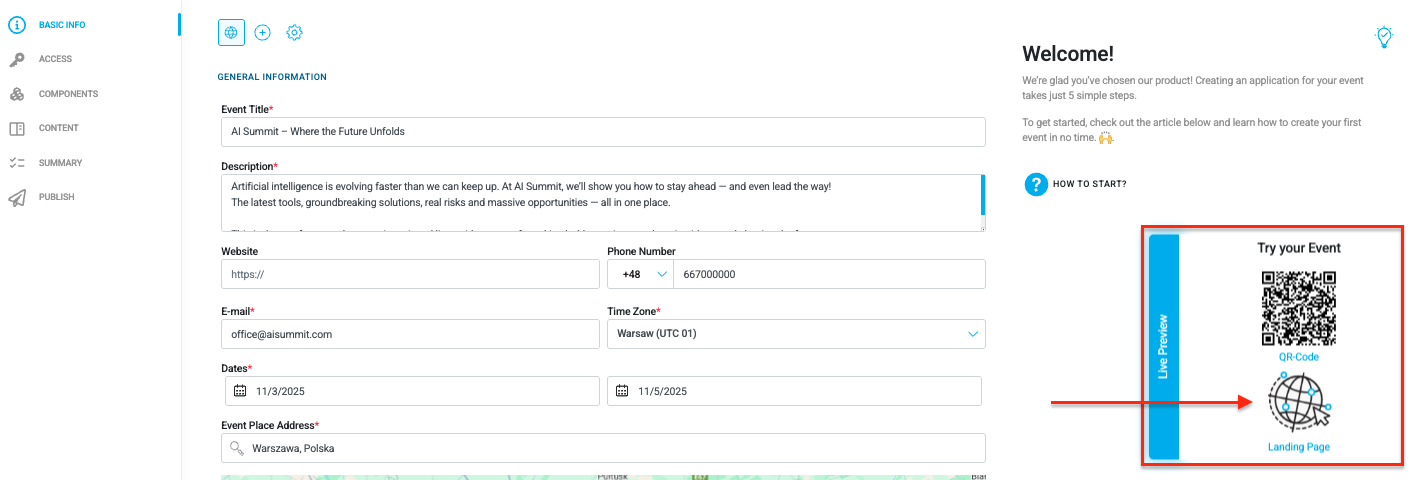
To sum up:
Log in to the management panel of the domain you chose.
Find the Redirects section (sometimes “Forwarding”).
Set up the redirect:
From the chosen domain
To the LP address in Meeting Application
Type: 301 (permanent)
Important: This method does not keep the domain address after redirecting – after clicking the link, the user will see the target address in the browser, e.g.: https://landing.meetingapplication.com/event/nazwa-twojego-eventu
Have a great event with Meeting Application!