From February/April 2026, every B2B invoice issued for ticket sales must be sent to the National e-Invoice System (KSeF), in order to gain legal effect. The standard PDF file generated by the system becomes only a “visualization” of the document, and a fully valid invoice is a structured XML file to which the Ministry of Finance has assigned a unique KSeF ID.
For Meeting Application to automatically send your invoices to the government system and receive their identification numbers, you need to log in to KSeF and grant the appropriate permissions for Meeting Application.

Structured invoice: A document in XML format, the only legally recognized form of invoice in KSeF. The moment of its issuance is considered to be when the system assigns it a unique, 35-character identification number (KSeF ID). Every visualization of such an invoice (e.g. in a PDF file) must contain a QR code, which is used to verify the document outside the KSeF system and to quickly preview the data online.
B2B invoice (Business-to-Business): An invoice issued to another entrepreneur (company). It includes the buyer’s NIP number and must be sent to KSeF.
B2C invoice (Business-to-Consumer): An invoice issued to a natural person who does not run a business (a consumer). These documents are not sent to KSeF, and the buyer receives their visualization (e.g. a PDF file).
ZAW-FA: A power of attorney form submitted to the Tax Office.
KSeF Master: A person authorized to manage the e-invoicing process in the company.
Before you start, make sure that:
You have the seller's VAT ID (NIP) that matches your company details.
You have access to Trusted Profile (Profil Zaufany), e-ID card (e-Dowód) or a qualified signature.
For companies (e.g. limited liability company): A ZAW-FA notification has been submitted to the Tax Office, authorizing a specific person to manage permissions in KSeF (individuals running a sole proprietorship are recognized automatically).

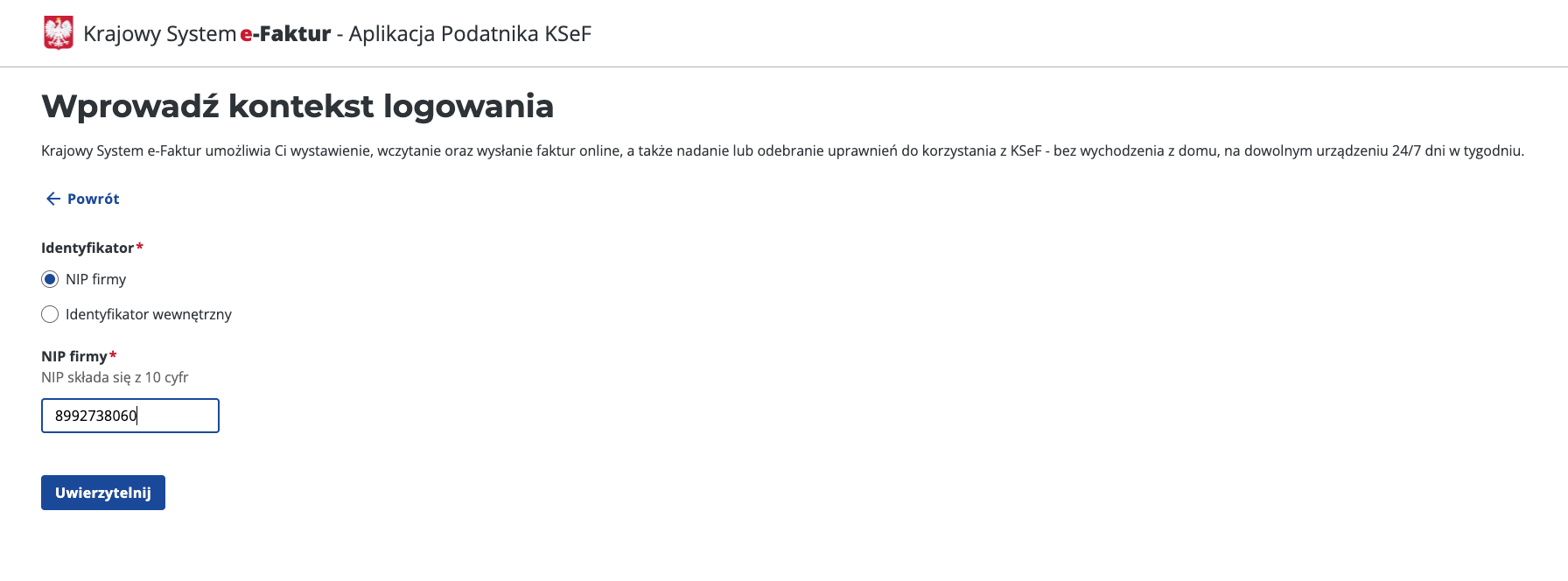
Go to the website ap.ksef.mf.gov.pl.
Select the option “Authenticate in the National e-Invoice System”.
Choose the login method (e.g. Trusted Profile). The login must be performed by the so-called KSeF Master – this is the business owner or a person authorized to manage permissions (indicated in the ZAW-FA form).
Enter the login context: select company NIP and enter the NIP number, which will be the same number that appears as SELLER on the invoices for tickets.
Authenticate to continue.
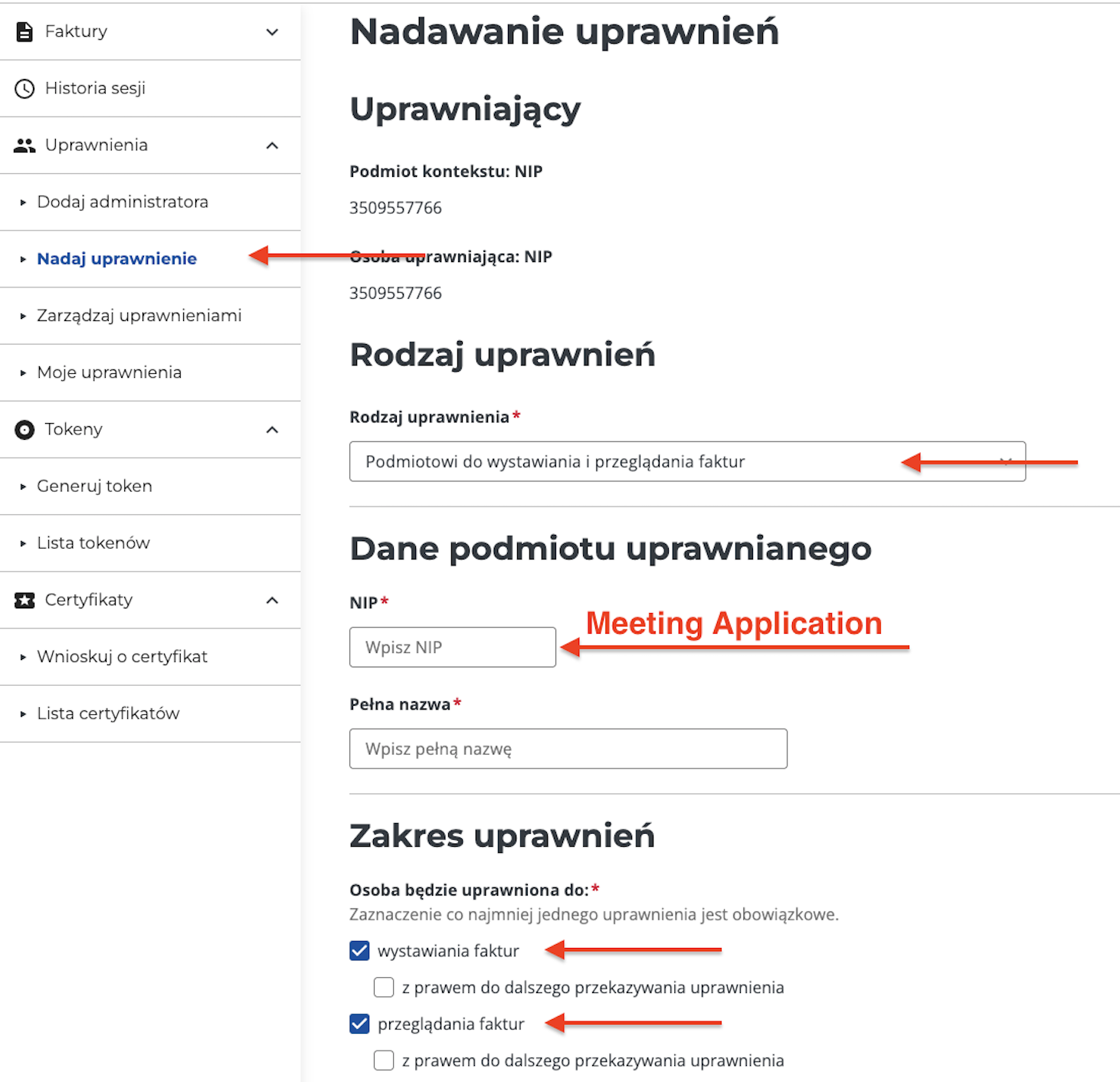
After logging in and signing the required documents, from the side menu select the Permissions tab -> Grant permissions.
Type of permission: Choose “To the entity for issuing and viewing invoices”
Enter Meeting Application’s NIP, i.e.: 8992738060
Enter the full name that will let you later identify the specific entity in the ministerial systems, i.e.: Meeting Application Sp. z o.o..
Scope of permissions: issuing invoices and viewing invoices
Click Save.
For the system to correctly generate structured invoices (XML) and send them to KSeF, it’s necessary to precisely fill in the data in the CREATE → ACCESS → TICKETS → Invoice tab.
This is a key section, because the data entered here is transferred directly to the generated invoices and is used to identify the taxpayer in the government system.
NIP (Tax Identification Number): It must match the NIP of the entity for which the KSeF certificate was generated. An error in this field will prevent authorization with the Ministry of Finance gateway.
Company name and address details: Make sure they match the data registered with the Tax Office (white list of taxpayers). The system requires you to provide the street, building number, city, and postal code, as well as to select the country from the available list.
To be able to generate the JPK_FA file: be sure to fill in the voivodeship and country
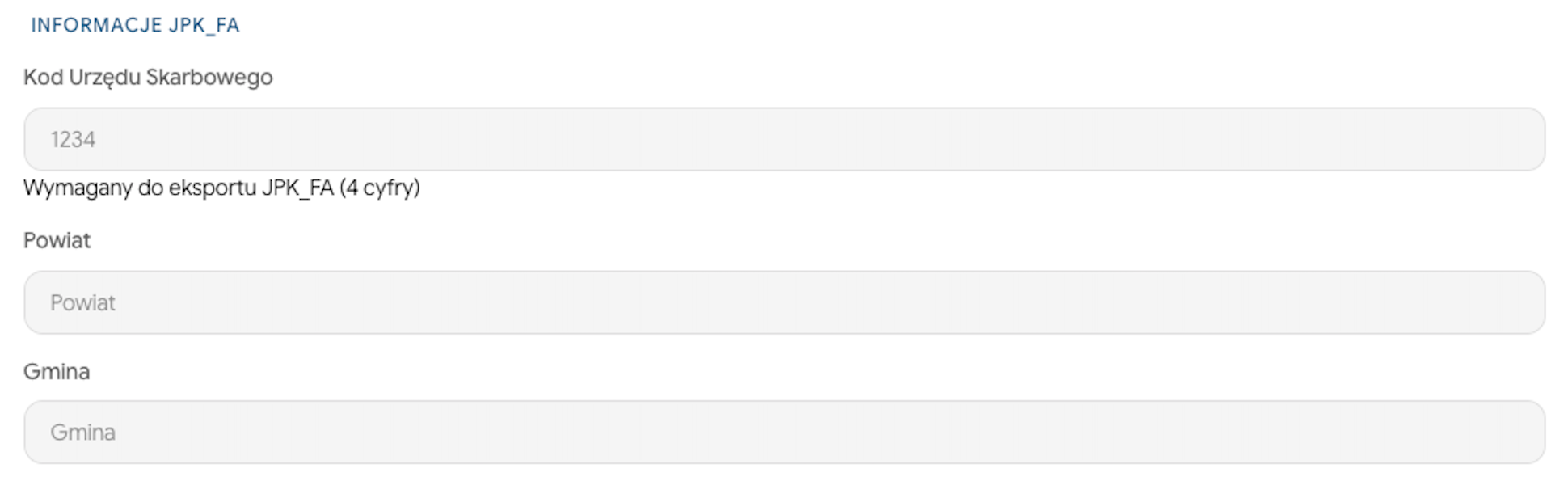
In the JPK_FA information section, enter the four-digit tax office code, as well as the county and municipality.
Based on these fields, the system will fill in the data in the JPK_FA file. You can export the ready file from the MANAGE → INVOICES tab. The JPK_FA file will be generated separately for B2B and B2C invoices.
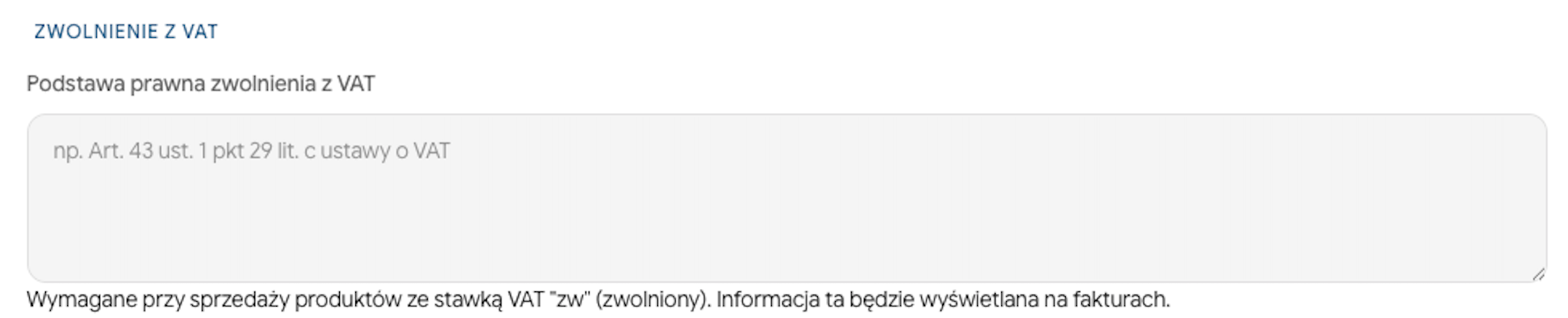
If your company uses a subjective or objective VAT exemption (ticket configuration with VAT rate "zw"), in the VAT EXEMPTION section you need to indicate the legal basis (e.g. Article 43(1)(29)(c) of the VAT Act). This information will be automatically added to the invoice when you select the "zw" (exempt) rate, which is a necessary condition for the correctness of the XML schema in KSeF.
In the context of the KSeF regulations coming into force in 2026, you should pay particular attention to the following points:
Separation of numbering series: Although the decision about the numbering model belongs to the Organizer, to meet the technical requirements of KSeF, the numbering for B2B and B2C invoices should be separate. This lets the system precisely distinguish documents that must be sent to the MF gateway (B2B) from those that stay outside the system (B2C).
B2B numbering (WITH VAT ID): Intended for companies. These invoices are automatically converted to XML format and sent to KSeF. We recommend using a unique prefix (e.g. /B2B), which makes it easier to identify documents with an assigned KSeF ID number.
B2C numbering (WITHOUT VAT ID): Intended for private individuals (consumers). Under the current regulations, these invoices do not go to KSeF, so a separate numbering series ensures clarity in accounting records.
Numbering scheme: The Organizer has full freedom in configuring fields such as day, month, year and index, as well as the option to add other fixed elements (e.g. event name or the split between B2B and B2C). Thanks to this, the configuration can be fully consistent with the tax regulations that apply to you, regardless of your company’s tax residence.
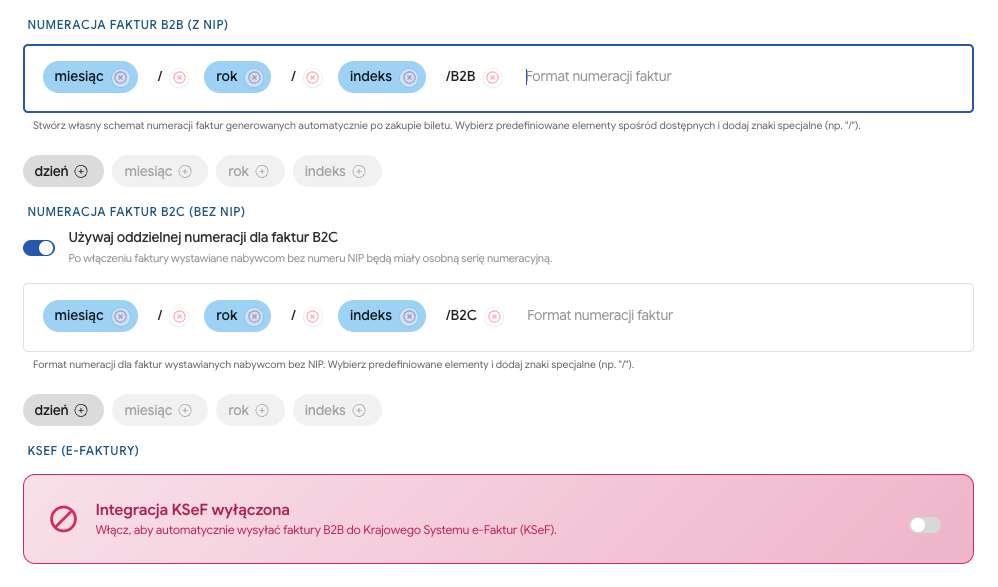
After filling in the above data and granting permissions in the Taxpayer Application (described in the first part of the article), activate the integration:
Toggle the KSeF integration enabled switch.

Click TEST CONNECTION.
Positive test - save the changes.
Failed test - check the data entered in the form, including the VAT ID number and the full details of the seller. Verify whether the appropriate permissions have been granted in the KSeF system in line with the first part of the article.
After enabling authorization, the ticket sales process will change as follows:
Automatic sending: After the participant buys a ticket, the system generates an XML invoice and sends it to the Ministry of Finance API.
Assigning a KSeF ID: The Ministry assigns the invoice a unique 35-character identification number.
Visualization with a QR code: The buyer will receive an email with a PDF invoice that contains a mandatory QR code. This code allows instant verification of the document’s authenticity in KSeF.
You as the administrator can see the status of the documents in the MANAGE → INVOICES.

The ticket purchase process is fully automated and goes through the following steps:
The participant goes to the event Landing Page and selects the ticket or tickets they want to buy.
In the second cart step, they enter the details of the person who will actually take part in the event (ticket owner) and any add-ons (workshops, products).
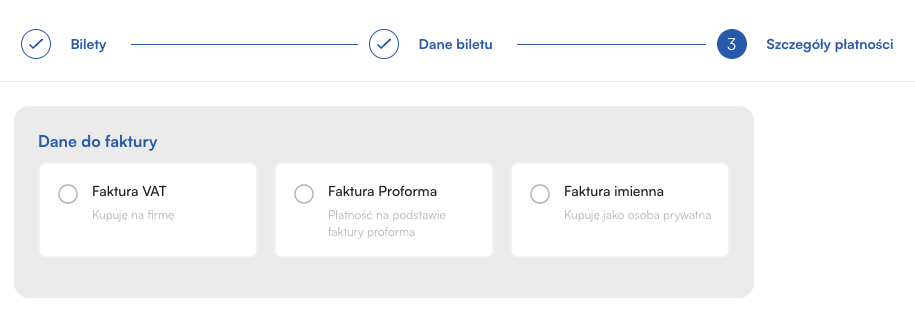
The buyer enters their details and declares the type of purchase:
Private person (B2C): First name, last name, email address and home address are required (necessary for a personal invoice).
Company (B2B): The buyer provides the VAT ID (NIP). The system allows automatic fetching of data from the VIES database, which minimizes the risk of errors. If VAT Invoice (B2B) is selected, the next step is to choose:
Company from the European Union: The system allows automatic fetching of data from the VIES database.
JST option: Only companies/entities registered in the EU can choose to make a purchase for a Local Government Unit. In this scenario, the buyer provides the data of the payer (e.g. Municipality/County) and the recipient (e.g. School/Institution). This process is fully compliant with the KSeF scheme.
Company outside the European Union: Intended for global contractors. This allows the correct issuing of an export invoice (e.g. with NP rate) and its exclusion from reporting to the Polish KSeF.
Pro-forma option: If the organizer has configured this method, the buyer can choose a pro-forma invoice as a document confirming their intention to purchase on behalf of a company (VAT ID/NIP required)
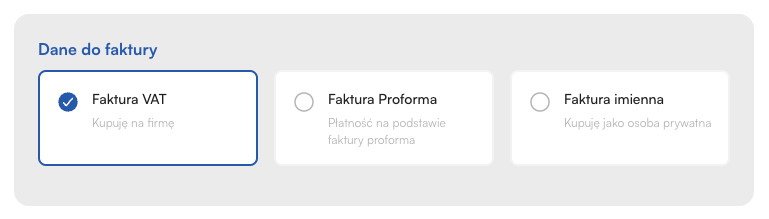
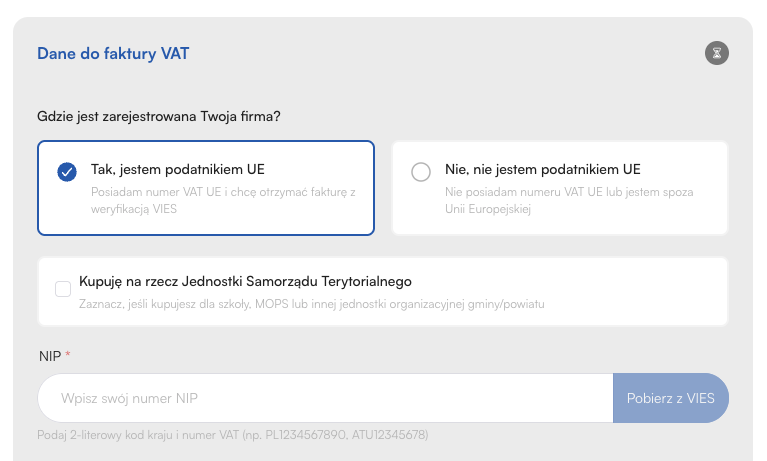
After filling in all required information, choosing the payment method and having the data approved by the buyer, the process moves to the payment gateway (PayU, AutoPay, Stripe) or a pro forma invoice is generated.
Receiving payment via gateway: The system automatically recognizes that the ticket has been paid for.
Sending to KSeF (B2B): Invoices for companies with a tax ID (NIP) are queued and sent to the Ministry of Finance. The Meeting Application system ensures the chronological order of numbering (even if there are downtimes of government servers) and retries sending until it gets accepted.
Receiving KSeF ID: Once the 35-character number and QR code are assigned, the system generates a visualization of the document.
Delivery to the buyer: The PDF invoice with a QR code is sent to the email address provided in step 3 of the cart.
The organizer has full insight into the process in the MANAGE → INVOICES tab.
Status: A preview of whether the invoice has been accepted by KSeF, or if an error occurred (e.g. inactive VAT ID).
Pending: The invoice has been correctly generated by the system and is in the queue to be sent to the Ministry of Finance gateway.
Sent: The document has been sent to KSeF and is waiting to be processed by government servers and assigned a unique identification number.
Accepted: The invoice has been successfully accepted by KSeF. It has received a 35-character KSeF ID number and the mandatory QR code. This is a legally binding document.
Rejected: KSeF has rejected the invoice (for example, due to an incorrect buyer VAT number or inconsistencies between the substantive data and the XML schema template). In this case, you need to verify the data and issue the document again.
Error: A technical error occurred while trying to establish a connection with the Ministry of Finance API (for example, a certificate issue or server timeout). The system will automatically try to resend it as part of the queuing process.
Not required: The document is not subject to the obligation of being sent to KSeF (for example, B2C invoices for private individuals).
Additional features:
Download: Access to all documents with QR codes (for accepted invoices).
JPK_FA export: Option to generate a data package for the tax office with a B2B/B2C split.
Have a great event with Meeting Application!