Meeting Application Sp. z o.o. creates custom apps commissioned by clients, and one of these is the ChiCamp app. User accounts created in these apps are stored in a shared Meeting Application system database. This means that deleting an account in one app will delete it in all apps produced by Meeting Application Sp. z o.o.
To delete your account, follow these steps:
Log in to the app.
Go to profile settings (e.g. by choosing the user icon and then the gear icon in the top right corner).
Select the “Delete profile” option and confirm that you want to delete your account.
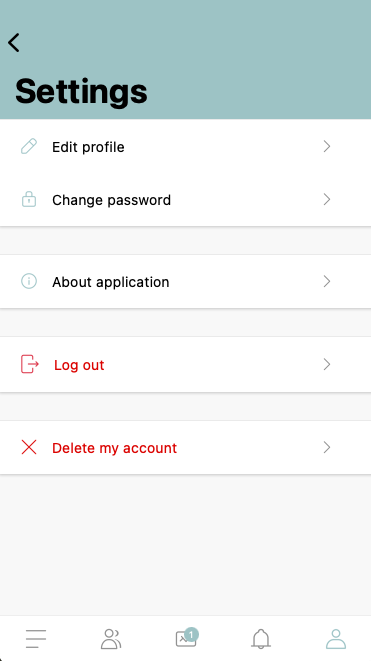
After deleting your account, all profile data will be permanently removed from our system.
Don't have access to the app?
If you don't have access to the app (e.g. due to missing login details or uninstalling it), you can submit an account deletion request by contacting us at: [email protected]
Additional information
Once your account is completely deleted, it won't be possible to restore any data.
You can find detailed information about the processing of personal data and how we handle data in our Privacy Policy.
If you have any questions or doubts, please contact the Meeting Application Sp. z o.o. team.