
How to delete an account in the 18. MKF
Meeting Application Sp. z o.o. creates dedicated apps commissioned by clients, and one of these apps is the 18. MKF app. User accounts created in these apps are stored in a shared Meeting Application system database. This means that deleting an account in one app will result in it being deleted in all apps produced by Meeting Application Sp. z o.o.
To delete your account, follow these steps:
Log in to the app.
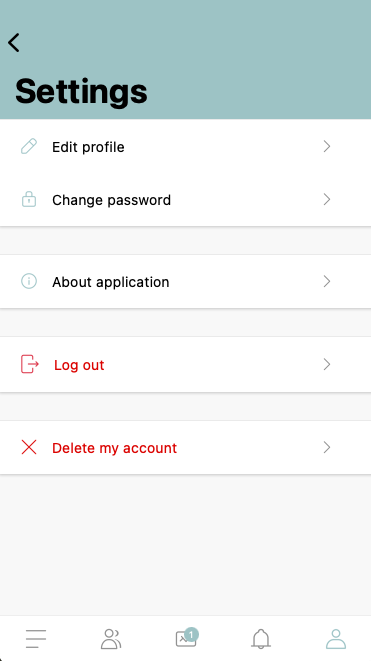
Go to profile settings (e.g. by choosing the user icon and then the gear icon in the top right corner).
Select the “Delete profile” option and confirm that you want to delete your account.
After deleting your account, all profile data will be irreversibly removed from our system.
Don't have access to the app?
If you don't have access to the app (e.g. because you don't have your login details or you uninstalled it), you can submit a request to delete your account by contacting us at: [email protected]
Additional information
Once your account is completely deleted, it won't be possible to restore any data.
You can find detailed information about how we process personal data and handle data in our Privacy Policy.
If you have any questions or doubts, please contact the Meeting Application Sp. z o.o. team.